

To stay competitive, companies have to invest in effective solutions for training their people. That is where Learning Management Systems (LMS) and Training Management Systems (TMS) come in. These two tools look similar on the surface, but they serve distinct functions that answer very different needs.
For HR decision makers and training managers, choosing between an LMS and a TMS is a strategic call that directly affects productivity and skills development. This article gives you a detailed analysis of what separates the two systems, their features, their benefits and their limits, so you can decide with clear eyes.
I. What is a Learning Management System (LMS)?
A Learning Management System is a software platform designed to centralise, manage and deliver educational content online. Increasingly, it is also used to design that content in the first place.
Picture a digital library where your employees can reach online courses, training modules and learning resources at any time, from any device. Handy, isn't it?
Main features
An LMS offers a range of features to optimise learning and training management:
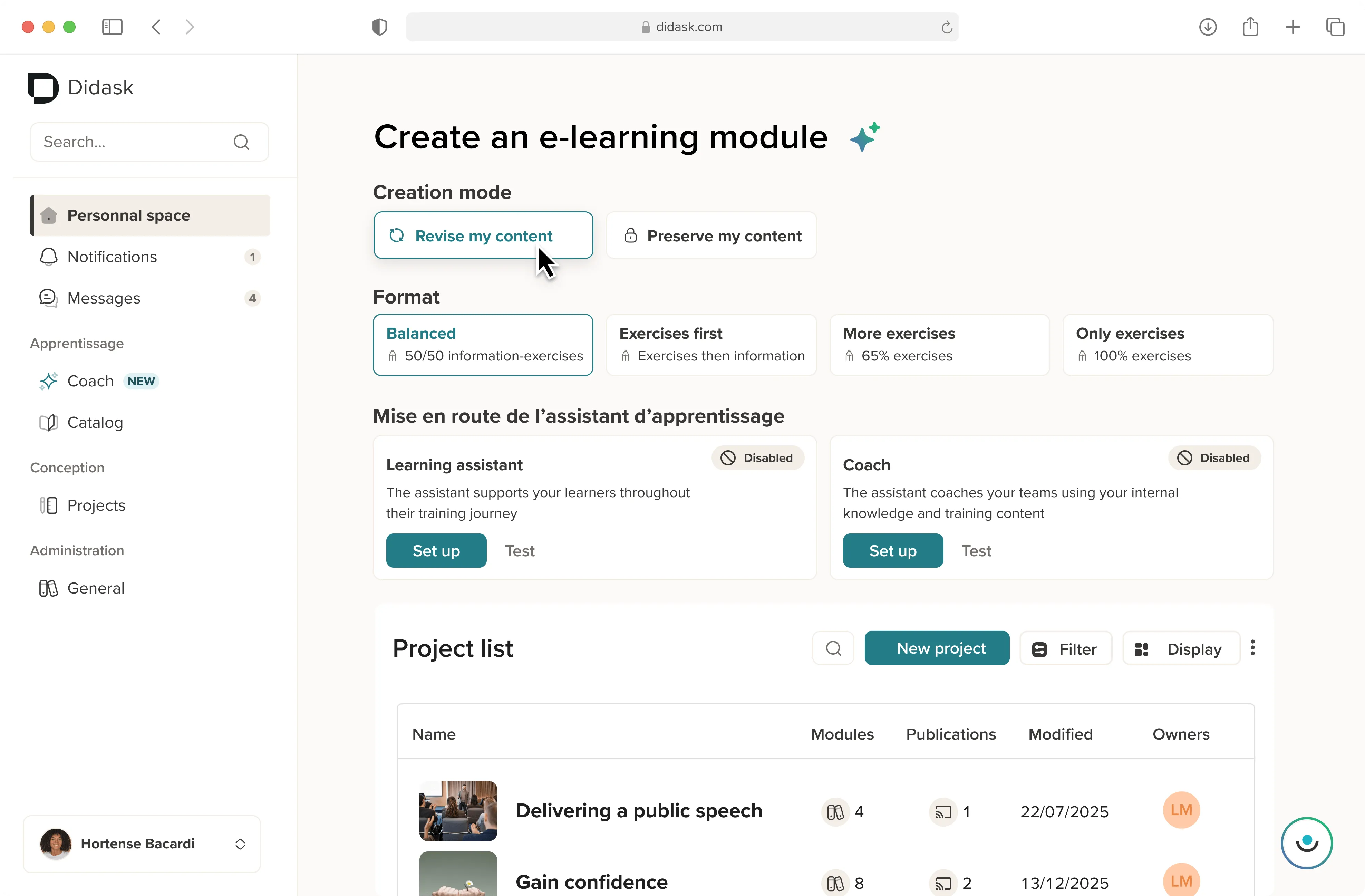
- Designing and delivering e-learning courses: a good LMS makes it easy to build interactive modules combining video, quizzes, PDFs and other multimedia materials. Its built-in authoring tool structures and personalises your training content without any technical skill. The Didask LMS platform goes further: thanks to its educational artificial intelligence, even a subject matter expert with no design background can build modules in record time.
- Tracking learner progress: through dashboards and detailed reports, an LMS lets you follow each learner, spot knowledge gaps and personalise learning paths accordingly. This is what turns training into measurable skills development.
- Assessment and certification tools: LMS platforms include tools to assess the knowledge and skills acquired, and to issue certificates of completion. That matters for companies that must evidence compliance with regulations or professional standards.
- Multimedia integration and mobile compatibility: to keep learners engaged, a modern LMS supports varied content types and stays accessible across devices, smartphones and tablets included. The Didask platform optimises the user experience with a mobile-first interface.
- Collaborative formats: forums, virtual classrooms, webinars and discussion spaces round out the setup for organisations that rely on social learning.
.png)
Granularity changes everything
A classroom session tells you whether someone was trained or not. An LMS tells you which specific concept they struggled with, and at what point. You then know exactly what to fix, instead of rerunning the whole course.
Benefits of an LMS
The benefits of an LMS for companies are numerous:
- Accessibility and flexibility: employees learn at their own pace and around their own schedule. A decisive advantage for organisations with geographically dispersed teams or remote working.
- Learner engagement: interactive features and gamification elements lift engagement rates and motivation.
- Tracking and reporting: detailed reports allow HR managers to measure how effective their courses really are and to make informed decisions.
- Lower costs: by digitalising their training, companies cut the costs tied to travel, room hire and external trainers.
- A learning culture: making training continuously available feeds talent retention and internal career progression.
The limits of an LMS
Powerful as it is, an LMS has its constraints:
- Technology dependency: users need capable digital equipment and a stable internet connection.
- Fit with the audience: not every employee is comfortable with digital tools. Onboarding support may be needed, particularly for field teams and frontline staff.
- Scope limited to online resources: unlike a TMS, an LMS does not handle the logistical or classroom side of training.
Who uses an LMS?
The LMS suits organisations that want to develop their employees' skills online, or that face constant regulatory change. It is used by:
- Companies: to standardise and centralise their professional training process.
- Trainers and instructional designers: to build and distribute interactive learning content.
- Learners: to access courses tailored to their needs and their role.
II. What is a Training Management System (TMS)?
A Training Management System focuses on the logistics and administration of training programmes. If the LMS is your digital library, think of the TMS as your highly organised back office, the one making sure no detail slips through.
Main features
TMS platforms bring robust features to manage the administrative side of training activity:
- Session planning and management: they make it easier to organise sessions by handling schedules, rooms, equipment and trainers. A good TMS ensures every session runs without a hitch.
- Managing registrations and participants: sign-ups, invitations, attendance tracking, waiting lists. The result is a smooth process and a better experience for participants.
- Training catalogue management: centralising the internal offer, the approved external providers and each employee's training history.
- Budget and invoicing tracking: a TMS follows training costs, manages budgets, supplier quotes and external funding. This is what makes return on investment measurable.
- Compliance and document management: these systems check that programmes meet the regulations in force, archive supporting documents and track employee certifications.
.webp)
The case of regulated sectors
In manufacturing, healthcare or construction, tracking certifications is a compliance issue in its own right. A TMS manages refresher deadlines, triggers alerts before expiry and generates the evidence auditors expect. It is often the first reason organisations deploy one, especially for compliance training at scale.
Benefits of a TMS
The benefits of a TMS for companies include:
- Centralised management: it brings together all training data and operations, which simplifies coordination between HR leadership and line managers.
- Resource optimisation: by planning available resources efficiently and tracking costs, a TMS avoids half-empty sessions and duplicated effort.
- Better compliance: monitoring certifications and regulatory training helps maintain compliance with each sector's standards.
- Fewer administrative tasks: automating repetitive work frees up time for HR teams to focus on strategic initiatives.
- Precise financial reporting: what did training cost last year? What is the average cost per employee trained? What share went to compliance versus development? A TMS answers in a few clicks.
The limits of a TMS
TMS platforms come with their own constraints:
- Administrative focus: these tools offer no pedagogical interactivity, unlike an LMS.
- Limited integration: some TMS solutions do not connect easily to existing e-learning tools.
- Largely classroom-oriented scope: a TMS does not deliver fully online modules.
Who uses a TMS?
The TMS suits organisations that need rigorous management of classroom training and the resources around it. It is used by:
- HR departments: to centralise the management of training activity.
- Training coordinators: to organise and optimise logistics.
- Multi-site companies and dispersed facilities: to coordinate sessions across different locations.
III. LMS, LCMS, LXP, TMS, HRIS, ERP: decoding the acronyms
The training software market piles up acronyms, and two products with similar names can play radically different roles. Before comparing a training platform with a management system, it helps to know what each category actually covers.
The boundaries between these categories keep blurring. Many platforms now embed the authoring tool of an LCMS and the recommendation logic of an LXP. A functional comparison run against your own use cases is therefore more reliable than any marketing label.
IV. What are the differences between a TMS and an LMS?
Now that the vocabulary is settled, let us look closely at what really separates the two systems.
Key differences
Orientation
- LMS: centred on learners and educational content. It lets you create, deliver and track online training modules, for a complete and interactive learning experience.
- TMS: centred on administration and logistics. It makes sure every training operation, from scheduling to invoicing, runs smoothly.
Objectives
- LMS: enrich learning through interactive tools and personalised pathways.
- TMS: optimise the administrative and financial processes around training, for flawless organisation.
Nature of the data produced
- LMS: educational data (completion rates, scores, time spent, concepts mastered).
- TMS: management data (cost per session, fill rate, certification expiry dates, budget consumed).
Complementarity
Although these systems pursue distinct goals, they complement each other well. In many companies, running an LMS alongside a TMS turns out to be the most sensible answer.
Take a concrete case: a company trains its sales teams with e-learning modules on the Didask LMS, while using a TMS to schedule in-person workshops. The combination delivers a coherent learning experience and lightens the administrative load.
V. Company or training provider: two very different uses of a TMS
Here is the costliest trap at selection time. A large share of the training management software on the market is built for training providers, not for companies. The features they showcase simply do not match your needs.
For a training provider or a training centre, the TMS is first and foremost a commercial tool. It manages the catalogue being sold, quotes, client invoicing, funding follow-up and the document management tied to quality certification. It behaves like a CRM paired with a back office. Some vendors push the logic all the way to a full ERP.
For a company, the need is strictly internal. It is about building the training plan, tracking training activity by department, handling external funding, tracing each employee's certifications and deciding what to run in-house versus outsource. The commercial dimension disappears entirely.
The practical consequence is simple: a tool comparison written for training providers will be useless to you as an in-house training manager. Always check who the offer is aimed at before digging into feature lists.
VI. How do you choose between an LMS and a TMS?
The right choice depends on your training objectives and on your organisation's specific needs. Here is what to weigh up.
Needs analysis
Training objectives
- If your priority is improving skills and the learning experience, an LMS such as Didask is your best ally. Its educational AI lets you produce modules quickly and effectively.
- If you have to manage complex logistics such as registrations or session scheduling, a TMS is the better fit.
Size of the organisation
- Large companies benefit from running both tools together to cover varied and complex needs.
- Small and mid-sized companies often do fine with an LMS alone, particularly when their training is mostly online.
Which formats do you need to cover?
Answering this question usually settles the debate faster than any feature comparison.
- Fully online training, remote onboarding, frequent regulatory updates: the LMS is enough.
- Recurring classroom sessions, multiple sites, heavy scheduling constraints: the TMS becomes essential.
- A blended learning setup mixing classroom, remote, webinars and manager coaching in the field: both tools earn their place, provided you connect them.
Weighing the benefits
Cost efficiency. An LMS cuts the costs tied to classroom delivery (venues, travel, trainer time), while a TMS automates administrative work and reduces operating overhead.
Scalability. Both systems grow with your organisation. An LMS absorbs a rising number of modules and learners, a TMS handles multiple sessions across different sites.
User engagement. With its interactive features, an LMS lifts learner engagement. A TMS guarantees flawless organisation, which shapes how the whole programme is perceived.
VII. How do you make an LMS and a TMS work together?
Buying both tools is not enough. Without a connection between them, you end up with two data silos instead of one.
Plenty of training teams still juggle a spreadsheet for planning, email for invitations, a platform for content and the HRIS for costs. The whole point of integration is to move that data around without re-keying it.
The three integration routes
- APIs: they synchronise data in real time between the two systems, registrations on one side, progress on the other. This is the most flexible approach, and the one that extends best to the rest of your digital ecosystem. Our article on the LMS API covers the technical pitfalls.
- E-learning standards: SCORM, xAPI and LTI push progress data from one system to the other. Choosing between SCORM and xAPI determines how granular the data you recover will be.
- Native connectors: some vendors offer pre-packaged integrations, faster to deploy but less configurable.
A single vendor or best-of-breed?
Two strategies compete here. Picking a vendor that supplies both modules simplifies rollout and support, at the price of strong lock-in and functional compromises.
Choosing the best solution in each category buys you more freedom, but requires integration effort and a data governance model defined up front.
Getting the rollout right
Deploying an LMS and TMS pair is a project, not a purchase. Treat it as one.
Map your existing processes first, then pilot on a limited scope before any general rollout. The main risk is not technical: it is user rejection. A confusing interface or persistent double data entry is enough to sink actual adoption, however good the tool is.
What you actually gain
Consolidated reporting, first. You can finally cross the cost of a course with the skills genuinely acquired, or online completion rates with classroom attendance. That is the precondition for a training ROI calculation that holds up.
A unified learner experience, second. Employees find their schedule, their content, their certifications and their training history in one place. Less friction means fewer drop-offs.
VIII. What if your HRIS were enough?
The question deserves asking before any investment. Nearly every modern HRIS now embeds a training management module.
These modules cover part of what a TMS does: registrations, budget tracking, training history per employee. For a small company with simple needs, that can be sufficient.
On the pedagogical side, though, the features stay basic: file hosting, rudimentary quizzes, no fine-grained tracking of what was actually learned. For organisations with high volumes, complex regulatory obligations or real e-learning ambitions, the HRIS quickly becomes a ceiling. We explain why in our analysis of HRIS platforms with a built-in LMS module.
Conclusion
The choice between an LMS and a TMS comes down to your specific needs. If you want to improve the learning experience and drive genuine skills development, look to an LMS such as Didask. If your priorities are logistical and financial, a TMS delivers more value.
The real question, though, is rarely one or the other. It is what level of integration matches your digital maturity. No training tool produces results in isolation from the rest of your ecosystem.
Would you rather see the platform in action? Book a free personalised demo with a Didask expert.
.webp)
.webp)
.webp)




.png)